
Now live: Edit appointments without leaving your calendar

What’s new – appointment modal in a side drawer
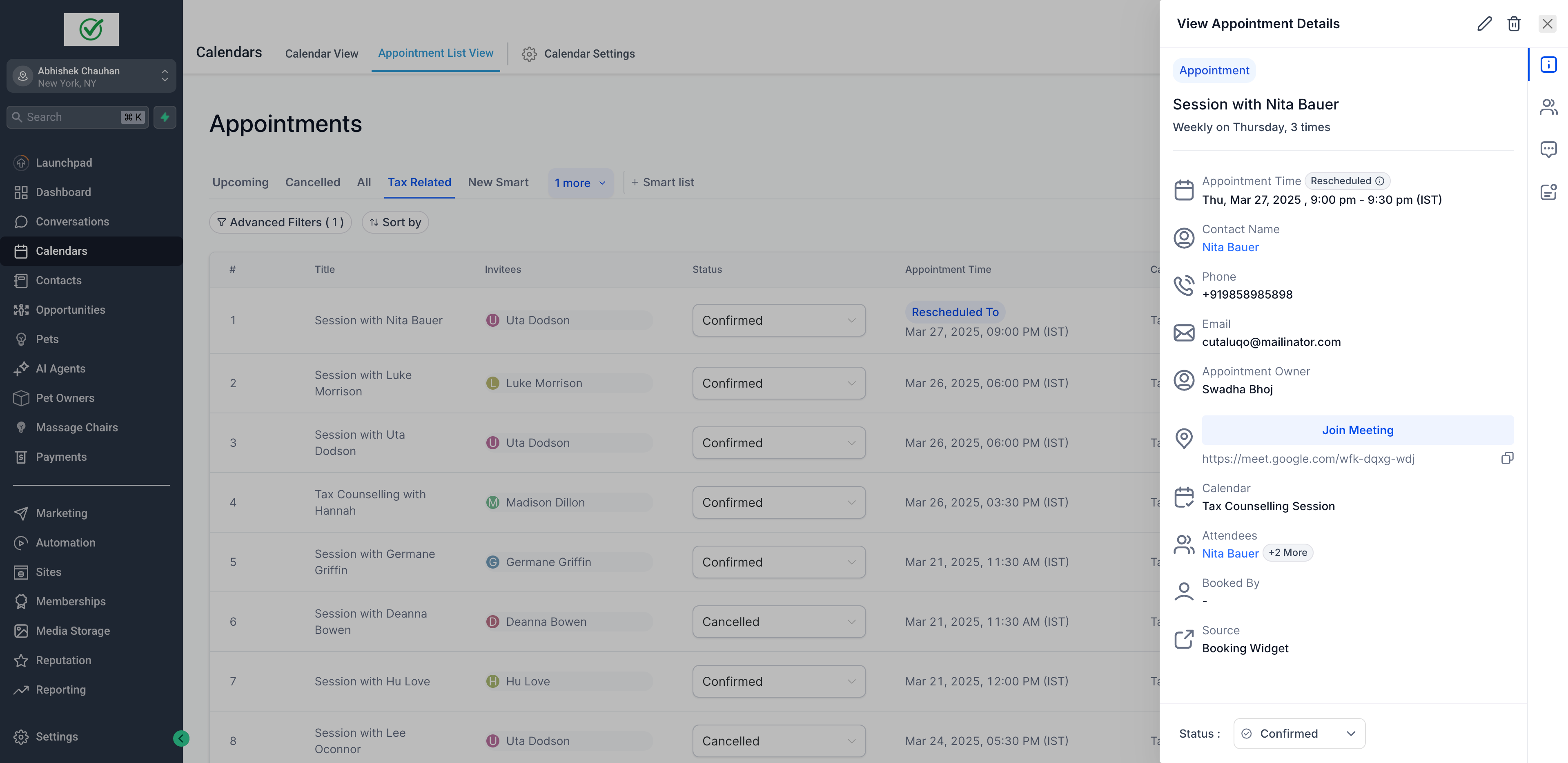
Daxko Zen Planner Engage introduces a more efficient way to manage appointments with the new Appointment Side Drawer. Instead of a full-page view, appointments now open in a sleek side drawer, allowing you to stay on your current screen while making edits.
This update enhances Daxko Zen Planner Engage as appointment scheduling software for gyms by reducing clicks, eliminating page reloads, and keeping staff focused on the day’s schedule.
What’s new in Daxko Zen Planner Engage
Appointment side drawer experience
Instead of navigating away from your calendar or appointment list, appointment details now open in a side drawer on the right side of your screen.
This side drawer design allows gym staff to edit appointments while maintaining full visibility of the calendar, improving speed and accuracy during busy hours.
Where to find the appointment side drawer
Simply click on any appointment from these views, and the side drawer will slide in from the right, displaying appointment information and editable fields in a clean layout.
- Calendar view
- Appointment list view
- Conversations tab
- Contacts tab
By making appointment editing accessible across multiple views, Daxko Zen Planner Engage supports more flexible workflows for front desk staff, coaches, and administrators.
Why this appointment scheduling update matters
Streamlined scheduling experience
- Inline editing: Quickly update key appointment details like date, time, and status directly from the side drawer without losing context or navigating away from your screen.
- Enhanced efficiency: Manage appointments, add notes, and make edits faster without leaving your current view.
- Scalable design: The side drawer layout sets the foundation for future upgrades, including form submissions, richer note editing, and expanded activity tracking.
Efficiency is critical in appointment scheduling software for gyms. According to G2 research, automated reminders and scheduling help reduce the administrative burden on staff by cutting down on manual follow-ups and management tasks, improving team efficiency with scheduling tools.
Benefits for gyms and fitness studios
Your staff can make updates in seconds, without loading screens or lost context, so you can serve more members with less friction.
For gyms managing high volumes of personal training sessions, intro appointments, and consultations, faster editing reduces errors and improves the overall member experience.
According to IHRSA, ease of access and convenience play a major role in how members perceive value and satisfaction in fitness businesses.
Everyday use cases gym staff will love
A coach calls to reschedule? Just slide open the drawer and update the appointment.
Need to adjust a recurring session? Stay in calendar view while editing details.
Checking availability before confirming a time? You can see the full day while making changes.
These real-world use cases highlight how appointment scheduling software for gyms should support fast decisions without disrupting workflow.
Visual walkthrough of the appointment side drawer
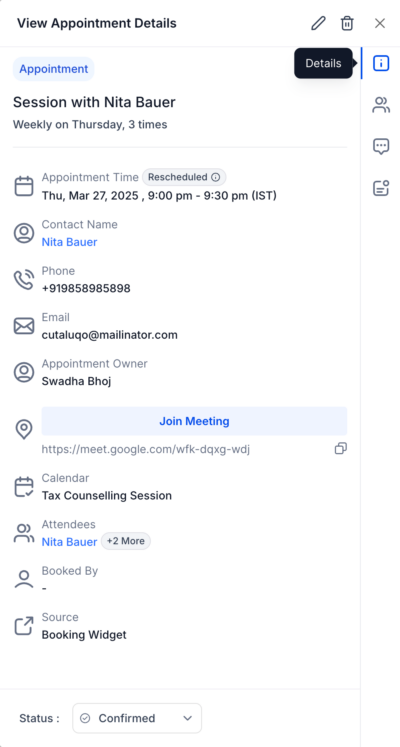
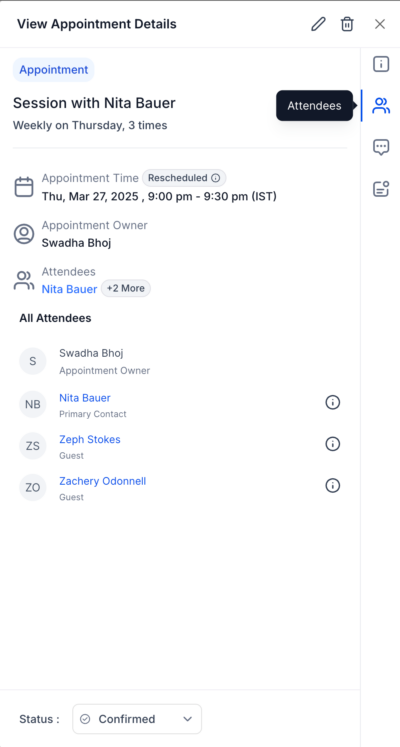
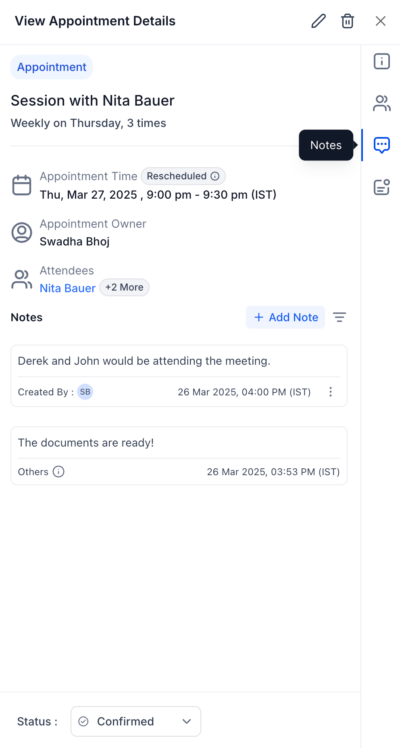
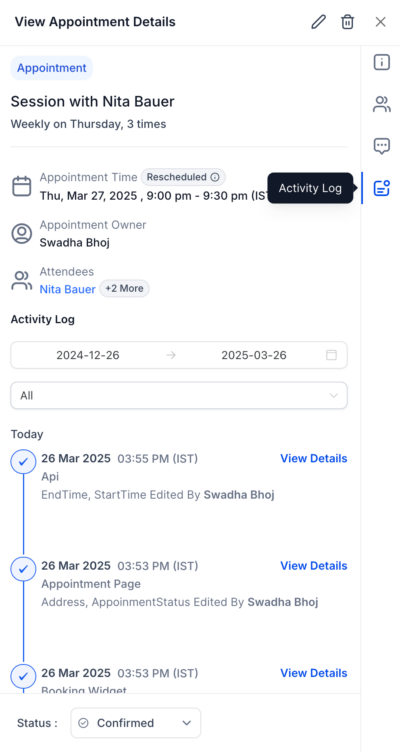
The side drawer keeps all relevant appointment information in one place, reducing the need to switch between screens.
Explore Daxko Zen Planner Engage for smarter scheduling
Save time and simplify scheduling with the new appointment side drawer experience. Your front desk will thank you.
Daxko Zen Planner Engage is built as appointment scheduling software for gyms that need speed, clarity, and flexibility as they grow.
Book a demo today, and discover how faster appointment scheduling works in real time.
FAQs about Daxko Zen Planner Engage
1. What is the appointment side drawer in Daxko Zen Planner Engage?
A: The appointment side drawer is a new interface in Daxko Zen Planner Engage that allows gym staff to view and edit appointment details without leaving the calendar or current screen. Instead of opening a full-page view, appointment information slides in from the right, making scheduling updates faster and more efficient.
2. Where can I access the appointment side drawer?
A: You can open the appointment side drawer from multiple areas in Daxko Zen Planner Engage, including the Calendar view, Appointment List view, Conversations tab, and Contacts tab. Clicking on any appointment from these views will open the side drawer automatically.
3. What appointment details can be edited from the side drawer?
A: From the appointment side drawer, staff can update key details such as appointment date, time, status, notes, and attendee information. This inline editing experience helps teams manage scheduling changes quickly without disrupting their workflow.
4. How does the appointment side drawer help gyms and fitness studios?
A: The appointment side drawer reduces administrative friction by minimizing clicks, eliminating page reloads, and keeping staff focused on the full schedule. For gyms and fitness studios, this means faster updates, fewer errors, and a smoother experience for both staff and members.
About the Author: Mike Wuest